
Why this matters
Many teams already coordinate in Slack. When work also lives in Blitzify, copying updates back and forth wastes time and creates confusion about what was approved. Slack Integration lets Zed meet your team where they already work, within limits you set.
A familiar business example
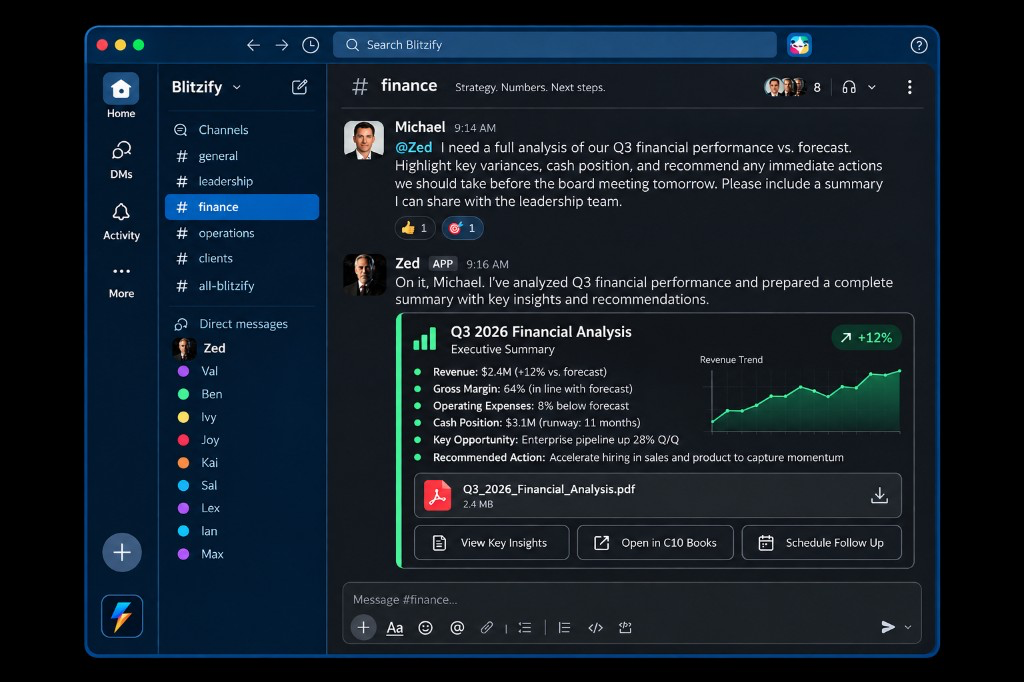
A regional manager lives in Slack with their leadership team. They want to ask Zed for a status update without switching to another tool.
What your team can ask Zed in Slack
Your team can ask for status on open work, request a summary before a meeting, or ask Zed to involve another specialist such as Sal or Ben. Zed responds in the Slack conversation you approved. He does not read every channel in your workspace by default.
What happens after a request
Zed gathers context from Blitzify and any connections you allow. He drafts a reply or next steps in Slack. If the request touches an important action, such as sending customer communication or spending credits, it waits for human approval in Blitzify before it executes.
How Zed coordinates the right specialists
When a question needs finance, sales, or integration help, Zed can involve the right Blitzify specialist. Ian may help when a connector or Slack connection needs attention. Your team sees who is working on what instead of starting separate threads.
What Zed can read and where he can respond
An administrator securely connects Slack for your organization. You choose which conversations Zed may use. Zed responds when someone mentions him or sends a direct message in those approved conversations. He does not monitor your entire workspace or every shared channel history by default.
What your organization controls
You decide which Slack conversations are in scope, who may approve important actions, and when to disconnect Slack. You can narrow access as your policies change. Zed follows your permissions and approval rules; he does not bypass them because the request arrived in Slack.
What still requires human approval
Outbound customer messages, purchases, publishing, and other important actions still require a human reviewer in Blitzify. Slack is a coordination surface, not a way to skip governance. Zed may notify you in Slack when something needs a decision.
What happens if Slack is disconnected
If Slack is disconnected or a channel is removed from scope, Zed stops participating there. Work continues in Blitzify with the context still available. Reconnect Slack or update approved conversations when you are ready to use it again.
When this is useful
This is useful when leaders and operators already live in Slack and want workforce updates without constant context switching. It fits teams that want faster questions and answers while keeping approvals in one place.
When it may not be the right fit
It is not a fit if you expect Zed in every channel without setup, unlimited history search, automatic PDF creation from Slack, guaranteed C10 Books actions from chat, or scheduling without review. It is also not a Slack partnership or endorsement; it is your controlled integration.
How to get started
Confirm who will administer Slack for your organization. Connect Slack from Blitzify integrations when your account is eligible. Choose a small set of conversations for a pilot. Run one low-risk request end to end, including an approval if needed. Expand only after your team is comfortable with the rules.